Effortlessly generate content with AI
ChatGPT is a free artificial intelligence chatbot from OpenAI. This AI tool provides users with multiple ways to complete tasks. Simply prompt the chatbot with your query, and an answer shall be given. Moreover, this handy tool is also capable of generating images with a simple command.
Top Recommended Alternative

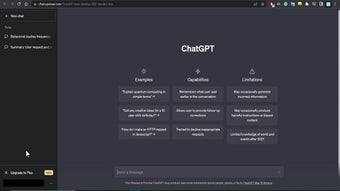
ChatGPT comes with a straightforward layout that immediately asks the user for input using the text box at the bottom of the screen. Enter your prompt there, and the bot will generate your desired text. You can re-generate the results to find the best answer to your query.
What is ChatGPT?
ChatGPT, which stands for Chat Generative Pre-trained Transformer, was initially built using the GPT-3.5 language model. This chatbot’s base is a neural network that draws data directly from the internet to generate its response. There are many things that you can do with this application, such as write copies, speeches, letters, scripts, and even poetry. Compose music of any genre and solve complex math problems. A downside is that it requires an internet connection to function.
Using this tool is simple; you only need to input a text prompt or a question, and it will handle the rest. It can even work on specialized text-based applications such as mathematical equations, writing literary material, coding based on a prompt, or even debugging code blocks. It works by determining your query, drawing relevant information from the internet, and using neural learning to generate a response.
A flexible tool with varied applications
The recent updates have brought a host of new features to ChatGPT. Users can now enjoy voice interaction, allowing them to communicate with the AI using speech. This feature makes the tool more accessible, especially for those on the go or who prefer a hands-free experience. Additionally, image input is another new functionality, enabling ChatGPT to analyze images and provide context-based answers, descriptions, or insights.
In addition, the “memory” feature allows ChatGPT to remember user preferences across sessions. This means the AI can adapt to individual styles, preferences, and needs, providing a more personalized experience. Users can also update, manage, or clear the memory whenever they choose. However, some inaccuracy comes into play when the topics are niche or new enough that information cannot be found yet. Furthermore, it's not up to par with the images or art humans produce.
What’s new with GPT-5.5?
The latest update for ChatGPT introduces GPT-5.5 Instant as the primary engine for everyday chats, making the AI noticeably faster and much better at getting facts straight. This model does a great job of cutting down on random mistakes, especially when you ask it for tricky legal or financial information. To make things easier, an auto-switching system instantly chooses between a quick answer and a deeper reasoning model depending on your prompt. Plus, a new "Memory Sources" badge appears whenever the AI remembers details from past chats.
In addition, the sidebar is turning into a complete workstation, thanks to the rollout of native ChatGPT Apps. Instead of jumping between different browser tabs, you can now connect external tools like Google Drive, Canva, or Slack and bring them into your conversation using simple @ mentions. This means you can pull in real-time data, update tasks, or coordinate schedules directly inside your chat window. For developers, a new Apps SDK allows them to build interactive visual features for these apps, which can even handle secure online shopping checkouts without making you leave the website.
Finally, keeping your account safe is much simpler with the addition of an optional Advanced Account Security setting. Turning this on eliminates standard passwords, text message codes, and email recovery links, which are often the weakest links against hackers. Instead, the platform switches entirely to modern, unhackable options such as your phone's face ID passkey or a physical security key. As a great bonus for anyone worried about data safety, turning on this extra security layer automatically activates a built-in privacy shield, ensuring that none of your conversations are used to train future AI models.
A powerful tool with expanding capabilities
ChatGPT offers a robust and versatile platform that simplifies content creation across multiple fields. With its evolving features, including voice interaction, image analysis, and memory capabilities, it caters to various user needs. Although it has limitations, especially with niche topics and image creation, ChatGPT's expanding capabilities make it an invaluable tool for boosting productivity and enhancing user experience in daily tasks.























.jpg)